Why ChatGPT does not recommend your website: 9 causes and how to check each
An owner asks ChatGPT to “recommend an accounting firm in Kyiv”, sees five other names and concludes that something is wrong with the site. Sometimes it is. But the owner saw one run of one prompt from their own account, which says nothing yet about the site or about what a client will see.
The causes below go in checking order: first what you can find out in five minutes for free, last what takes weeks of work. We covered the difference between mentions, ads and shopping in ChatGPT separately: what you can buy in ChatGPT and what you have to earn.
# First work out what exactly you saw
| What the answer shows | Likely cause | Where to look |
|---|---|---|
| No links | ChatGPT probably did not search the web | Cause 2 |
| Links, but your site is not among them | Crawler access or the sources it relies on | Causes 4–9 |
| Your site is among the links, but the company is not named | The page was cited as a reference, not as an option | Cause 3 |
| The company is named, but the site is not linked | The name came from someone else’s page or the model’s memory | Cause 3 |
| Present one time, absent the next | Normal variation between answers | Cause 1 |
# Three causes that have nothing to do with your site
# 1. You checked once
ChatGPT’s answers to the same prompt differ from run to run. In our sample (1,197 answers to 110 Ukrainian-language prompts about digital services, 5 October to 12 November 2026), two consecutive runs of the same prompt shared few sources:
- the median overlap was 20%;
- in 86.2% of pairs fewer than half the sources matched;
- in 23.6% of pairs no source matched.
We compared 1,019 pairs in total. This is the overlap of source sites, not of company names in the text: we did not count separately how stable the mentions are.
What to do: run each prompt 3–5 times and count the share of answers you appear in. “Absent from one answer” and “absent from all five” are different diagnoses.
# 2. ChatGPT did not search the web
According to OpenAI’s help article, ChatGPT searches the web when it decides the question needs fresh information or when the user turns search on. Otherwise it answers from what the model learned in training. In our sample 91.1% of answers had links; the rest had none.
If the answer has no links, there was most likely no search, and then neither crawler access nor your page content affected it. Turn on search and repeat the prompt. You cannot quickly change what the model “remembers” or check which texts went into it. So the rest of this article covers only answers with search.
# 3. You are cited but not named, or the other way round
“ChatGPT does not recommend me” can mean three different things:
- your site is not among the sources and your name is not in the text;
- the site is among the sources, but the text names others: your page was used as a reference;
- the name is in the text, but the link goes to a directory or review that mentions you.
The second case is fixed through page content: if the page only explains “what accounting outsourcing is”, ChatGPT takes the definition from it and recommends companies from other sources. The third case is not a site problem at all: you are already recommended, just through someone else’s page. Open the list of sources under the answer and see where each name came from.
# Three causes related to access
# 4. The search crawler is blocked in robots.txt
OpenAI has three crawlers, and advice about ChatGPT often confuses them.
| Crawler | What it does | Does it affect ChatGPT search |
|---|---|---|
| OAI-SearchBot | Collects pages for ChatGPT search | Yes, it is a requirement |
| GPTBot | Collects text that may be used for model training | No, the settings are independent |
| ChatGPT-User | Opens a page when a user asks for it | No; robots.txt rules may not apply to it |
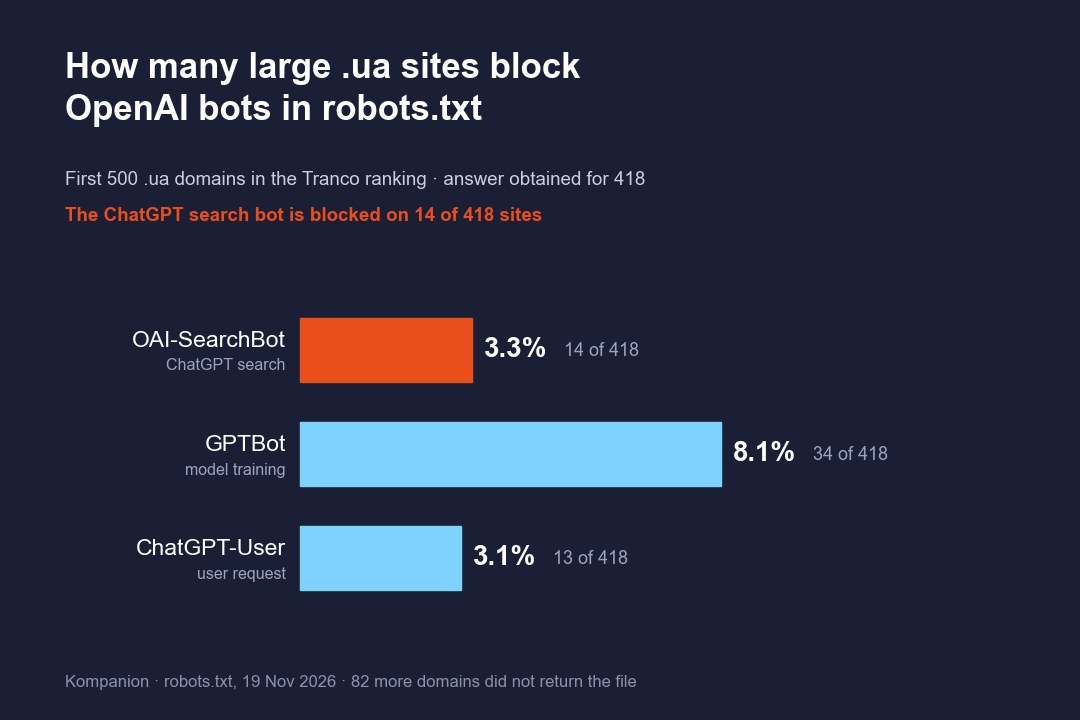
On 19 November 2026 we downloaded robots.txt from the first 500 .ua domains in the Tranco ranking. We got an answer for 418: 399 files and 19 sites without robots.txt, where everything is allowed.
- OAI-SearchBot is blocked on 14 of 418 sites (3.3%). On 11 of them it is a blanket ban on all bots (
User-agent: *andDisallow: /); only 3 block it by name. - GPTBot is blocked on 34 sites (8.1%).
- On 21 sites GPTBot is blocked and the search crawler is allowed. In 14 cases this is a ready-made rule set from Cloudflare.
- monobank.ua and hotline.ua, by contrast, explicitly allow OAI-SearchBot with a separate rule.
These are the country’s most popular domains: media, government sites, large shops. For small business sites the shares may differ. A cautious conclusion: among large sites a search crawler blocked in robots.txt is rare, and most often it comes from a blanket ban, not a deliberate decision.
The check takes a minute. Open yoursite/robots.txt and find the lines with OAI-SearchBot and the User-agent: * block. If Disallow: / sits under either of them, the crawler is blocked. To allow it:
User-agent: OAI-SearchBot
Allow: /
OpenAI’s documentation says search picks up the change in about 24 hours. The reverse case has a catch too: a blocked page can still appear in an answer as a link with a title. To keep it out entirely you need noindex, and the crawler sees it only if access is open.
# 5. Hosting or bot protection stops the crawler
OpenAI says separately that hosting and CDN must let through requests from the crawler’s published IP addresses. robots.txt does not show this: the file may allow everything while the protection in front of the site answers the crawler with a 403 code or a “confirm you are not a robot” page.
In the same sample, 82 of 500 domains did not serve even robots.txt to our script: 36 answered with a 403 code (22 of them sit behind Cloudflare), 9 more showed a verification page from the hosting or a protection service, and the rest were connection errors and other failures. This does not prove that OpenAI’s crawler gets the same: protection often lets known bots through by their addresses. But it shows where to look if robots.txt is fine and the site is missing from answers.
How to check:
- In the server logs, find requests with
OAI-SearchBot. If there are none over a month, the crawler is not reaching the site or has not come yet. - Look at the response code: 200 means the page was served, 403 or 429 means the protection stopped it.
- Compare the request’s IP address with the list at
openai.com/searchbot.json. That is how you tell the real crawler from a fake. - In the dashboard of Cloudflare or another protection service, open the settings for AI bots. Since July 2025 Cloudflare has changed its default rules several times, and its own documentation pages now describe them differently. No version blocks OpenAI’s search crawler by default, but look in your own dashboard, not in someone else’s article.
- Check what your hosting adds. In one file from our sample, OAI-SearchBot was blocked in a rule set generated by the hosting, not by the owner.
A request from your own computer with the crawler’s name substituted (curl -A "OAI-SearchBot") proves nothing: the protection also checks the address, so it may block you and let the real crawler through, or the other way round.
# 6. The text appears only after JavaScript runs
OpenAI does not say whether its crawlers execute JavaScript. The best independent evidence is a test by Vercel and MERJ from December 2024: OpenAI’s crawlers downloaded script files but did not execute them. The test is two years old, so this is an assumption to check on your own site, not an established fact.
The check: open the page, choose “View page source” (Ctrl+U) and search for a sentence from the main text. If it is not there and you see only an empty container and scripts, the crawler may have seen an empty page. A developer fixes this: the text has to arrive already in the HTML.
# Three causes related to sources
# 7. You are not in the search results ChatGPT uses
ChatGPT does not search for your prompt word for word. According to OpenAI’s help article, it rewrites the question into one or several more precise search queries and sends them to search providers; OpenAI names Microsoft and Shopify among them. The query may include an approximate location based on the IP address and what ChatGPT remembers about the user.
Two things follow from this.
- A check from your own account is not what a client sees. Check in a temporary chat or logged out, and without a VPN.
- If the site cannot be found in ordinary search for queries like “accounting services for sole proprietors Kyiv prices”, it has no way into the answer either.
Whether ChatGPT relies on the Bing index specifically is not officially confirmed. OpenAI’s help article for business plans says only that queries may be passed to the Bing search engine. Adding a site to Bing Webmaster Tools is free and a reasonable step, but with no guaranteed result.
# 8. ChatGPT relies on directories and reviews, and you are not in them
For “who should I hire” questions, ChatGPT often takes the answer from places other than company sites. In our sample, a directory (Clutch, IT-Rating and others) or a ranking page was among the sources in 50–53% of such answers: 626 answers to 55 prompts, the range of two counting methods. Clutch alone accounted for 398 of 6,676 links (6.0%).
We did not measure whether the companies ChatGPT names are the ones on these lists. So a presence in directories and reviews is a practice with no guaranteed effect. But it is easy to check: open the sources under the answers to your prompts and see which pages repeat. If they are three directories and two reviews that do not include you, start with them, not with rebuilding the site.
# 9. The page does not answer the client’s question, or answers in the wrong language
An “About us” page with general statements does not answer the question “how much does bookkeeping cost for a Group 3 sole proprietor (FOP)”. A page with prices, terms and limits does. Direct answers on pages are also a practice, not an OpenAI requirement, and their effect is not guaranteed.
On language we have one observation from our sample. For Ukrainian-language prompts, ChatGPT almost never linked to pages with /ru/ in the path: 5 of 6,676 links. We did not check the language of pages without a language prefix. If clients ask in Ukrainian and the service page exists only in a Russian version, a Ukrainian version is the safer choice.
# What is not a cause
- A blocked GPTBot. It concerns model training, not search.
- No llms.txt. OpenAI’s documentation on its crawlers and on search does not mention this file.
- No schema markup. The same applies: OpenAI does not mention it. Markup is useful for Google, but nothing confirms it as a cure for “ChatGPT does not see me”.
- “The site is not registered with OpenAI.” There is no way to submit a site manually, and any public site can appear in answers.
# How long to wait after the fixes
| What you changed | When to expect an effect | Where the timeframe comes from |
|---|---|---|
| robots.txt | About 24 hours | OpenAI’s documentation |
| Protection or hosting rules | After the crawler’s next visit | OpenAI gives no timeframe |
| Page content, directories, reviews | Unknown | OpenAI gives no timeframe; placement is not guaranteed |
So measure the result by comparison, not by the calendar: the share of answers that mention you before the changes and a few weeks after them.
# How to measure without fooling yourself
- Write 10–20 prompts the way a client asks them: “who should I hire”, “how much does it cost”, “which is better”.
- Run each one 3–5 times, in a temporary chat or logged out, without a VPN.
- For each answer, record whether it had links, whether your site is among them, and whether the company is named in the text.
- Count shares, not “yes or no”, and repeat the same set once a month.
Twenty prompts with four runs each make 80 checks a month in ChatGPT alone. That is why measurement is often handed to trackers. Answerly Tracker takes answers from the ChatGPT app, not through the API, and shows the number of runs behind every share; the Starter plan costs $29 a month, and 1,000 trial credits are available. Other tools include OtterlyAI, also from $29 a month. We checked the prices on 12 and 16 November 2026.
Visits from ChatGPT to your site show up in Google Analytics 4 in the AI Assistant channel and under the utm_source=chatgpt.com tag.
# When to call in a contractor
Causes 4–6 are fixed by a developer or hosting support: it is a one-off job, not a monthly service. Causes 7–9 need sustained work on pages, directories and reviews, and this is where you compare agencies.
Based on prices we collected on agency sites for our GEO agencies in Ukraine ranking, a monthly package starts at 4,000 ₴ at Compas, 25,000 ₴ at Webpromo and $600 at Chyzh Agency. The first two prices were collected on 26 October, the third was checked on 16 November 2026. What to ask of a contractor and which promises should put you on guard are covered in the article on promotion in ChatGPT.
# Methodology
- The robots.txt measurement. The first 500 domains ending in .ua in the Tranco list L5KW4 of 18 November 2026. The files were downloaded on 19 November with an ordinary script, without the name of an OpenAI crawler. Result: 399 files, 19 sites without robots.txt, 82 with no answer (36 with a 403 code, 23 connection errors, 9 verification pages, 14 other failures). Shares are calculated from the 418 domains with a known answer. We checked only access to the home page. The sample includes hosting providers’ service domains and one parked domain. In one file the rules can be read two ways; under the other reading, 13 sites block OAI-SearchBot and 33 block GPTBot.
- ChatGPT answers. A tracker re-runs the same set of prompts in the ChatGPT app: 1,197 answers, 110 Ukrainian-language prompts about digital services, 17 dates from 5 October to 12 November 2026. Source overlap was counted as the share of shared domains between two consecutive runs of the same prompt. For other niches and languages the figures may differ.
- Documents. We read OpenAI’s page on its crawlers and the Cloudflare materials on 19 November 2026; OpenAI’s help article on search in a Web Archive copy from 30 October, and the FAQ for publishers in a copy from 4 October 2026.
- What we did not measure. How protection services respond to OpenAI’s crawler itself; whether the crawler executes JavaScript today; whether the companies ChatGPT names come from the directories it links to.
# See also
- Promoting a business in ChatGPT in 2026: what you can buy and what you have to earn
- GEO Optimization 2026: how a small business gets into AI answers without a budget
- GEO agencies in Ukraine 2026: six firms ranked on public evidence
- Free GEO website audit 2026: 11 AI search readiness checks ranked
Frequently asked questions
Why does ChatGPT not know my company when the site has been live for a long time?
It probably answered without searching the web. In that case the answer is built from what the model learned in training, and a small company may not be in there. Check whether the answer has links. If it has none, turn on search and repeat the prompt: ChatGPT will then look for pages now, and what matters is access to your site and the sources it relies on.
I blocked GPTBot in robots.txt. Is that why ChatGPT does not show me?
No. GPTBot collects text that may be used for model training. A different crawler, OAI-SearchBot, decides whether a site appears in ChatGPT search, and OpenAI says the two settings are independent. In our sample, 21 of 418 sites block GPTBot and still leave the search crawler allowed.
How long do I wait after opening access to the crawler?
According to OpenAI's documentation, a robots.txt change is picked up in search in about 24 hours. For the other steps OpenAI gives no timeframe and does not guarantee a place in the answer. So do not count days. Count the share of answers that mention you before the changes and a few weeks after them, on the same set of prompts.
Will an llms.txt file or schema markup help?
There is no confirmation. OpenAI's documentation on its crawlers, its help article on ChatGPT search and its FAQ for publishers do not mention these tools. Markup is useful for ordinary search, and llms.txt breaks nothing, but there is no basis for paying for them as a way into ChatGPT answers.
Do I need to register my site somewhere for ChatGPT to see it?
No. OpenAI's FAQ for publishers says any public site can appear in answers, and it offers no way to submit a site manually. There is one condition: do not block OAI-SearchBot in robots.txt or at the level of hosting or bot protection.
How do I verify that OpenAI's crawler is visiting my site?
In the server logs, find requests with the name OAI-SearchBot and look at the response code: 200 means the page was served, 403 or 429 means bot protection stopped the crawler. Compare the request's IP address with the list OpenAI publishes at openai.com/searchbot.json. A request from your own computer with the crawler's name substituted proves nothing, because the protection also checks the address.
Why does ChatGPT recommend a competitor with a worse site?
Because for questions about choosing a contractor it often relies on directories and reviews rather than company sites. In our sample, a directory or ranking page was among the sources in 50–53% of such answers. If the competitor is on those lists and you are not, the quality of your site has little effect on that answer.